
You can now connect Claude, ChatGPT, Cursor, Codex and other AI tools to Lodol, ask for an automation in plain words, and your AI builds it directly in your Lodol workspace. From then on, Lodol runs it whenever it should, on a schedule or the moment something happens, whether or not your AI tool is still open.
Your AI needs somewhere to put it
AI tools have become remarkably good at working out what you want and how to get it done. They're a poor place for an automation to live. Ask one for an automation on its own and what comes back is a small software project: a script, a schedule to run it, a file holding your passwords, and a log nobody reads. Someone has to keep all of that running, and the night it quietly breaks is the night you find out who.
Connected to Lodol, the same request becomes one workflow that anyone on your team can open and read, running somewhere built to run it. Your AI does what it's best at, which is building. Lodol does the part AI tools were never meant to do: running the same steps on every trigger, keeping your passwords safe, and recording every run.
What it looks like
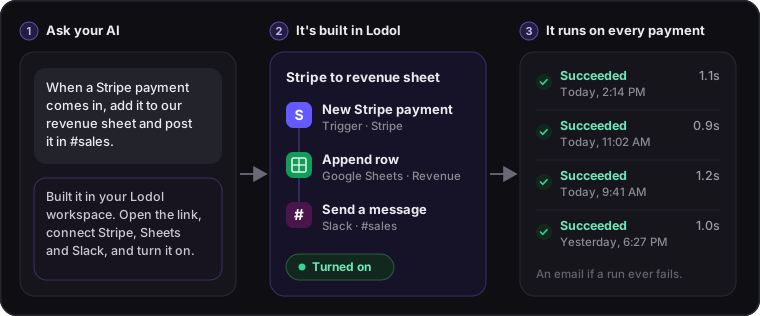
Say you type: "When a Stripe payment comes in, add it to our revenue sheet and post it in #sales."
Your AI picks the apps and builds three steps in your workspace: a New Stripe payment trigger, an Append row step that adds the payment to your revenue sheet in Google Sheets, and a Send a message to a channel step that posts it to #sales in Slack. Then it gives you the link.
Open it, and any step whose app isn't connected yet shows a Connect button. Connecting an app is a one-time setup, and Lodol walks you through each one: Stripe needs a key from your Stripe dashboard, while Google Sheets and Slack ask you to create access in their developer settings first. Turn the workflow on, and every payment from then on is logged and announced. Want a change later, like posting only payments over $1,000? Ask for it the same way you asked the first time. Saving a change pauses the workflow until it's switched back on with the new version, which your AI can do for you.
Connecting your AI takes a minute
- Claude: one click adds Lodol as a connector.
- ChatGPT: turn on developer mode in its settings and add one web address.
- Cursor and VS Code: one click installs it.
- Claude Code and Codex: one command in your terminal.
- Everything else: Gemini CLI, Lovable, Replit and any other tool that supports MCP, the open standard AI tools use to plug into other software, connect with the same web address.
Every tool then asks you to sign in with your Lodol account, so there's no key to copy and paste. No account yet? You can make one at that moment. The exact step for each tool is on our homepage.
What your AI can do, and what it can't
Once connected, your AI can find your workflows and explain them, build new ones, change existing ones, run them, and read a finished run to see what happened. It can't delete workflows, connect apps, or manage your members, billing or secrets. When you connect it, you choose the workspace and can untick any permission you'd rather it didn't have, and it can only ever do what your own role allows. You can disconnect it at any time from the Connect AI page in Lodol.
Lodol never shows your AI your passwords or API keys. You connect each app in Lodol itself, any key you add is stored there encrypted, and workflows use it by name, so your AI builds with the name while the value never passes through the chat. And its changes land in the workflow's version history, just like a change made by anyone on your team, so you can see what changed and roll it back in a click.
When something goes wrong
You hear about it straight away. If a run fails, you get an email and a notice in Lodol. The run shows every step it took, how long each one took, and the one that stopped it. Your AI can read the same run, work out what went wrong and fix the workflow, and the fix goes into the version history too, so you can undo it if you change your mind.
What it costs
Your AI only spends tokens while it builds or changes a workflow, not every time the workflow runs, and that usage stays on your AI tool's own plan. Lodol charges per run, however many steps the run takes. The Free plan includes 200 runs a month, and Builder starts at $18 a month for 2,500. Here's how our pricing works.
You don't need to write code
You ask in plain words, and your AI picks the apps, wires the steps together and sets what starts it. The result is a workflow you can open in Lodol's visual editor and read one step at a time, or change yourself without asking anyone. Lodol connects to more than 750 apps, from Gmail and Slack to QuickBooks and Salesforce, and a workflow can reach almost anything else that has an API.
Connect your AI in a minute.
Pick your tool on our homepage and follow the one step. Or start from one of our ready-made workflows and ask your AI to adjust it.


