- Added a Run button in the builder with a live run sidebar so you can test workflows without leaving the editor
- Added many new built-in actions for filtering lists, formatting dates, validating text, generating random IDs, and more
- Moved workflow upload timestamps to the server for consistent sorting and history
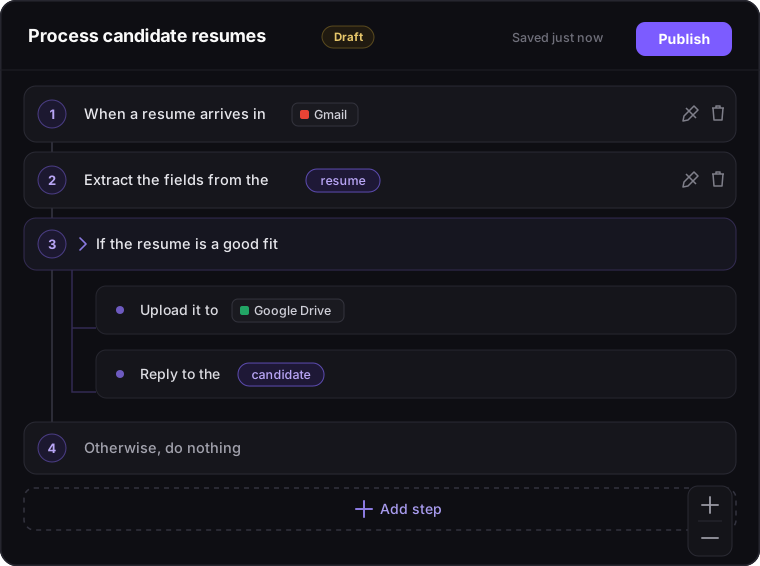
- Now renders variable references and quoted values as inline chips in step text for easier scanning
CHANGELOG
What's new in Lodol
The latest improvements, fixes, and features from the Lodol team.
July 16, 2026
- Improved custom roles with grouped permissions and a more readable roles layout
- Added toast notifications for member actions and invite resend limits on the Team page
- Enabled email delivery for notification events with branded templates and a direct link to notification settings
- Added a verification email resend option on the login page
- Now sends billing update emails to workspace owners for subscription and payment changes
- Polished the design of the web app for readability and consistency
- Fixed comment pins in the builder so they stay attached to steps when the edit sidebar opens
- Fixed the free trial banner overlapping other UI elements
- Fixed various small display issues in the workflow builder, runs, logs, team, integrations, and settings screens
July 13, 2026
- Improved trigger reliability across server autoscaling
- Added a new control-flow action to stop workflows early with success or failure
- Added a new control-flow action to repeat steps a fixed number of times
- Added remainder (%) and exponent (**) math operators to the Math & Logic actions
- Added many new integrations and added new actions to existing ones
- Workflows now autosave in the builder instead of requiring manual publish
- Redesigned the workflows page with workflow previews and a cleaner menu
- Added operations to the workflows page for duplicating and downloading multiple workflows at once
- Added a button to uninstall integrations from the Integrations page
- Added ability to customize accent colors across the app
- Added an onboarding flow and guided tour for new users
- Fixed workflow runs so loop headers stay anchored above their iterations in run output for both live and past runs
- Fixed runs and logs pages so rows with profile pictures match the height of rows with initials
- Fixed timezone and website profile updates so saving preferences no longer fails when website is empty
July 9, 2026
- Added new built-in actions for formatting numbers, shifting dates, comparing dates, merging lists, trimming text, counting words, and extracting emails, URLs, numbers, or patterns from text
- Improved arithmetic and logical steps so their results show clearly in run output, including a friendly message for divide-by-zero
- Made workflow triggers easier to work with by binding trigger outputs to variables, exposing trigger parameters in the builder, and improving schedule trigger validation messages
- Improved the workflow editor canvas with smoother Figma-like zoom and pan, automatic fit-to-view, clearer loop connectors, and a ghost preview of steps while adding them
- Redesigned the add-step picker with clearer sections, direct access to built-in operations, better variable field browsing, and preserved scroll position when navigating back
- Made variable declarations and human-input prompts editable after creation, with a new type selector for variables and safer, clearer validation errors
- Improved the run page so it no longer re-runs workflows on refresh, shows accurate step failure status, and handles human input modals without losing text
- Added new permissions-based custom roles, in a dedicated Roles tab in Workspace settings for Pro users
- Updated the Manage Members page to a new design, including improved member cards, invite and transfer-ownership flows, and support for SSO re-authentication when transferring ownership
- Made profile pictures global across workspaces and added separate workspace icons that show in the workspace switcher
- Remembers your most recent workspace per user so you return to it after logging back in
- Allows any member of two workspaces to copy workflows between them, not just admins or owners
- Redesigned the Integrations list and detail pages with a new layout, category icons, improved search and filters, and a more polished install experience
- Added over 20 new integrations, and another dozen in beta
- Improved AI model integrations by adding model dropdowns for OpenAI, Anthropic, Gemini, and DeepSeek, updating default models, and exposing max_tokens for Anthropic
- Improved Gmail, Yahoo Mail, Discord, Slack, Gmail reply, and other messaging integrations for better error messages and more reliable triggers
- Moved Google SSO to a popup OAuth flow, refreshed SSO button styling, and improved login error messages
- Limited active sessions to one per device and adjusted inactivity timeouts to 60 minutes
- Removed the access-code requirement from signup so anyone can create an account
- Redesigned the workflow run pages, audit Logs page, workflow details page, and workflow preview page with updated cards, badges, and layouts
- Redesigned Settings, Billing & Plan, API Keys, and MFA screens to match the new design system and added a shared legal footer on all auth pages
- Redesigned the Members page and workspace settings to match the new design system, including updated avatars and workspace icons
- Improved the workflow builder comments experience with sidebar comments, floating thread cards, filters, keyboard shortcuts, and drag-to-reposition pins
- Normalizes pasted content to plain text in rich editors and improved autofill styling in input fields
- Updated the app logo usage to the current SVG version and improved dark-mode legibility for dark integration logos
- Added a Notification History section in Settings with pagination, bulk delete, and clear-all controls
- Made in-app notifications navigable with deep links to workflow comments and team events
- Added a concurrency limit to the free plan and improved concurrency slot handling so stuck runs no longer block new executions
- Fixed Gmail reply so it always targets the correct message and threads properly
- Fixed workflow publish errors so the real server error message is shown in the builder and on the Workflows page
- Fixed the workflow editor Create button so starting a new workflow from an existing one no longer reuses old state
- Fixed the run page so refreshing or using back/forward does not start a duplicate execution
- Fixed pagination dropdowns on Runs and Logs so menus no longer clip off the viewport
- Fixed password reset actions and account inline form spacing in Settings so buttons align correctly and forms reset when switching tabs
- Fixed various issues with triggers and human input, including Slack and Discord channel access errors, Slack auto-join behavior, and human-input modals reopening or losing text
June 21, 2026
- Added a draft/publish lifecycle for workflows so you can save drafts, publish when ready, and toggle publish state from the Workflows page
- Improved recurring workflow scheduling with support for user timezones
- Improved workflow upload and import validation to reject invalid workflow definitions before they run
- Added integrations for Apollo.io, Instantly, Hyperbrowser, and PhantomBuster
- Improved Gmail, Zoho Mail, and Yahoo Mail actions for more reliable behavior
- Redesigned login, signup, and password reset flows with clearer layouts and messaging
- Improved password reset reliability, including better token handling and reuse prevention for recent passwords
- Fixed password reset links from Settings so they work consistently
- Added inactivity logout and device session management for better account security
- Improved handling of expired and invalid tokens to avoid noisy errors
- Strengthened audit logging for admin actions, API keys, authentication events, and session revocations
- Added a Notifications settings tab to control per-event in-app and email preferences by workspace
- Made in-app notifications persistent with read state, timestamps, and a history endpoint for future views
- Redesigned the dashboard to a single-sidebar layout with updated icons, navigation, and dark mode support
- Restyled the Workflows page with horizontal cards, updated empty states, and improved toolbar icons
- Refreshed the workflow builder top bar, canvas, add-step flow, and Copilot layout for a more polished editing experience
- Improved workflow empty states with clearer search and filter messages and direct actions
- Added a loading spinner to the login button and refined various auth page visuals and copy
- Removed workflow run credits in favor of fixed-price subscriptions
- Introduced a 14-day Pro trial for new users
- Improved billing error handling and audit logging for subscription changes and payment issues
- Hid Stripe billing controls for workspaces not managed by Stripe
- Fixed issues editing steps inside branches and loops so new steps insert in the expected locations
- Fixed recurring triggers so they stop cleanly when a finite schedule is exhausted
- Fixed login session expiry while on polling pages so the app handles sign-out more gracefully
- Fixed password reset flows that previously showed invalid-token errors even with valid links
- Fixed workflow kebab menus clipping off-screen on the Workflows page
May 28, 2026
- Added cross-workspace workflow copy so you can duplicate workflows into other workspaces you admin or own
- Added ability to export workflows to Zapier and n8n
- Providers can now be installed directly from the workflow builder
- Improved workflow search bar behavior with a clearer way to clear search
- Improved session handling for the 'Remember Me' feature
- Improved pagination button accessibility with clearer labels and behavior
- Fixed issue where the JSON workflow editor could sometimes display ghost text
May 25, 2026
- Added workflow version history with the ability to roll back to previous versions
- Added bulk workflow delete with multi-select, select-all, and confirmation
- Added real-time presence indicators in the workflow editor to show teammates currently viewing a workflow
- Updated loop visualization in the workflow preview with clearer loop-back arrows
- Added per-workspace profile pictures with upload, crop, and remove controls in settings
- Improved logs and run history pages with pagination for easier navigation
- Added MFA lockout to protect accounts from repeated failed verification attempts
- Improved Google authentication handling for more reliable sign-in
- Improved session management controls in the settings page
- Added a global toast notification system for consistent, non-blocking alerts across the app
- Improved login error messaging to be clearer and more helpful
- Fixed loop bodies not allowing step insertion in the workflow editor
- Fixed built-in actions showing an Install button on the Integrations page
May 12, 2026
- Added workflow recommendations directly in the editor with apply, dismiss, and preview
- Improved recommendation browsing with tags, filters, sorting, and clearer cards
- Improved workflow step text with clickable links, document filenames, and clearer URL handling
- Indented steps inside loops and branches and improved nested branch rendering for clearer structure
- Added expandable step details and historical variable snapshots on workflow runs for easier debugging
- Improved workflow execution view to show actual executed steps in loops and conditionals
- Increased the maximum workflow complexity limit to support deeper nesting
- Updated workflow sorting so newest and oldest use last updated time
- Added an install status filter and improved search behavior on the integrations page
- Updated Brex and other provider details for more accurate descriptions
- Improved workflow recommendations system behavior and cleanup when workflows are deleted
- Added Lodol branding and theme-aware logos across the app and auth pages
- Improved the add-step experience with reorganized categories and smarter text wrapping
- Added parameter example chips, optional labels, and clearer tooltips in the add-step modal
- Simplified variable insertion by relying on inline mentions instead of a separate picker
- Improved workflow recommendations filters, dropdowns, and visual polish
- Added documentation links to action cards in the workflow builder
- Expanded provider docs to cover newly shipped integrations and keep specs in sync
- Fixed schedule and frequency triggers so they run reliably
- Fixed workflow execution completion states and SVG rendering issues
- Fixed Gmail email parsing and reply body handling in related actions
- Improved reliability of Google integrations
April 30, 2026
- Added Smart Actions for invoice extraction, expense classification, and invoice-purchase order reconciliation
- Added document upload and preview support for Smart Actions and other document analysis steps
- Introduced new integrations for Sage Intacct, NetSuite, QuickBooks Online, Brex, Finta, Encord, and additional Microsoft 365 apps
- Improved integration reliability across dozens of providers based on a full API audit
- Redesigned the add step experience with a multi-phase provider and action picker, including Core, Functions, and Integrations
- Added Smart Actions as a built-in category in the workflow builder
- Added a variable inspector panel and per-step execution time tracking on workflow runs
- Improved trigger handling, including per-workflow event queues and clearer trigger options in the builder
- Improved workflow execution reliability with checkpointing, recovery for interrupted runs, and automatic SSE reconnection
- Improved live step progress UI and made workflow execution open in the current tab
- Added an API Keys management panel in workspace settings for the Developer API
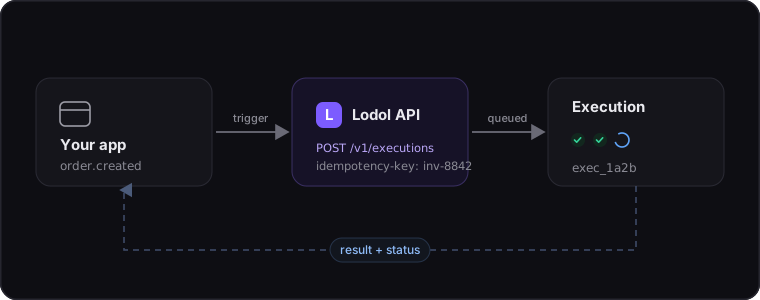
- Added per-team rate limits and idempotent execution controls for Developer API requests
- Strengthened web app security and improved SSO signup IP detection
- Added CSRF protection to logout and improved session cleanup during login, MFA, and SSO flows
- Improved the workflow creation page, settings pages, and dashboard layout for a cleaner, more consistent UI
- Added tooltips and inline descriptions for action parameters, including object and array fields
- Added a 'Recently used' section in the add step modal and made the add item button more prominent
- Improved workflow builder visuals, including if/else branch rendering, arrows from Start, and always-visible step menus
- Made provider logos clearer in dark mode and removed HTTP method badges from action cards
- Added Developer API endpoints for listing workflows and managing async executions
- Documented core built-in functions, expressions, native callables, and triggers in the API reference
- Merged integration installation into the docs page and refreshed Developer API documentation to match the live API
- Fixed file upload buttons for object and array file parameters so uploads work reliably across Smart Actions
- Fixed Gmail actions showing duplicates in search and corrected many parameter labels and display templates
- Fixed triggered workflows failing when seed variables collided with user-defined variables
- Fixed the workflow JSON download button on the create page not working in some cases
- Fixed multiple Microsoft, Google, and other third-party integrations to better match their latest APIs
- Improved audit log CSV exports to prevent formula injection in spreadsheet tools
March 2, 2026
- Introduced new integrations for Airparser, Airtable, Anthropic, Box, ClickUp, Coda, Eventbrite, Linear, and YouTube
- Integration action outputs are now displayed in a more human-readable format on the workflow execution page
- Added a configurable iteration limit for while loops to prevent infinite loops
- Added a 24-hour maximum duration to the built-in Wait() action to prevent excessively long waits
- URLs in integration setup instructions are now rendered as clickable links
- Linked trigger-generated executions in a table on the parent workflow's execution page for easier navigation
- Trigger polling is now automatic every 1 minute on paid plans and every 15 minutes on the Free plan
- Added a 'Poll now' button on the workflow execution page to manually trigger an immediate poll
- Enforced that triggers must be the first step in a workflow
- Added an AST depth limit to prevent stack overflows from deeply nested expressions
- When importing workflows from JSON, the workflow creator is now set to the importing user
- Improved workflow execution performance and robustness
- Improved the login and signup flows for clearer, more user-friendly UX
- Added a button to resend MFA codes if codes expire or aren't received
- Verification emails now include a link to complete the signup process
- Applied security hardening updates to protect against potential attack vectors
- Fixed the 'Back to Workflows' link on the workflow execution page not displaying correctly
- Fixed the workflow preview not automatically panning and zooming correctly for larger workflows
- Fixed the workflow preview initially aligning to the left when editing an existing workflow
- Fixed the 'Start' and 'Add step' text not aligning vertically on the start node in the workflow preview
- Fixed a potential race condition in credit deduction
- Fixed an issue where credits could sometimes fail to reset at the start of a new billing cycle
- Fixed a potential race condition in trigger initialization
- Fixed a potential race condition when creating a new account
- Fixed an issue where users could sometimes get stuck when accepting a team invite
- Fixed the team invite modal not displaying correctly in dark mode
- Fixed an issue where Google/Facebook SSO could sometimes get stuck during account creation
- Fixed an issue where a workflow would crash when dividing by zero using math built-ins
February 3, 2026
- Introduced new integrations for Calendly, Canva, Discord, Dropbox, Notion, OpenAI, PayPal, Slack, Stripe, Telegram, Todoist, Trello, and X (formerly Twitter)
- Workflow steps can now be added and removed directly in the workflow editor without querying the workflow copilot
- Added a dedicated editor for object and array parameters that converts them to valid JSON
- Workflow variables can now be inserted into parameters via an Insert button
- The workflow copilot now alerts users when a generated workflow uses an integration that hasn't been connected to their workspace yet
- Improved workflow execution performance and robustness
- Fixed an issue where the Undo and Redo buttons did not display in the JSON editor panel
- Fixed an issue where the visual editor could not fully display workflows exceeding a certain length
January 25, 2026
- Added new Gmail, Google Drive, Google Docs, and Google Calendar actions and triggers
- Added support for automatically triggering recurring workflows from API events, such as receiving a Gmail email
- Workflow action parameters can now be edited directly in the workflow editor without re-querying the LLM
- Added the ability to stop, pause, and resume active workflows from the Executions page
- Workflow errors are now recorded and surfaced on the Executions page
- Refactored workflows to execute server-side
- Removed workflow creation limits
- Improved AI agent workflow generation quality
- Added a Billing tab to workspace settings
- Added an annual subscription option (discounted vs. monthly) on the Pricing page
- Restricted workflow import/export to Pro plans and higher
- Restricted Team and Enterprise plans to a single shared workspace
- Restricted audit logs to Enterprise plans only
- Removed the ability to delete workspaces (users are now prompted to contact support)
- Team invites can now only be sent and accepted when seats are available
- Suspicious login alert emails now include login time, device, and location
- Applied security hardening updates to protect against potential attack vectors
- Fixed an issue that could incorrectly display an error when logging out
- Fixed an issue where the settings page could sometimes flicker when switching tabs
- Fixed an issue where the back button on the Pricing page sometimes returned users to the wrong page
- Fixed the light/dark theme selector not displaying correctly
- Fixed placeholder text in settings fields appearing too similar to entered text
January 8, 2026
- Introduced a new Google Sheets integration
- Added a new Executions page to view, monitor, and manage workflow runs from the dashboard
- Workflows now support undo and redo in the creator for faster rollback when editing
- Added scroll boundaries to the workflow preview to prevent accidental panning away from the workflow
- The workflow preview now automatically adjusts its default zoom level based on workflow size
- Redesigned core dashboard components for improved clarity, usability, and visual consistency
- Revamped the Workflows page for better navigation and easier workflow discovery
- Reintroduced the Pricing page with a new design and updated plan offerings
- Applied security hardening updates to protect against potential attack vectors
December 31, 2025
- Added redirect buttons on key auth screens to prevent users from getting stuck
- Improved the MFA code input for faster, smoother verification code entry
- Introduced a new Display action to print variables directly in the extension sidebar
- Added a new Google Docs integration
- GoTo action URLs now render as clickable links
- Long URLs in GoTo actions are now automatically shortened
- Added a new JSON Editor mode for directly editing workflow JSON
- Workflows now render as interactive step graphs in the workflow creator, with pan and zoom support
- Workflows now display both the time they were created and the time they were last modified
- Workflows now show the creator's name and profile photo
- Added application names and icons to relevant workflow steps
- Improved API and built-in action steps to be more human-readable
- Dates in workflow steps now render as readable strings instead of ISO timestamps
- Added support for deleting workspaces
- Redesigned the Docs and Settings pages
- Admins are no longer able to remove other admins from workspaces
- Logs can now be searched by ID
- Added the Lodol logo to the top-left of the dashboard
- Made various UI polish and consistency improvements across the dashboard
- Fixed a timezone issue that could cause birthdays to display one day off
- Fixed flickering when navigating between dashboard pages
- Fixed the workflow steps list not scrolling when exceeding a certain height
- Fixed an issue where Google integrations could require periodic re-authentication
November 20, 2025
- Users can now create Lodol accounts using a valid access code
- MFA is now skipped when logging in from a previously trusted IP within 30 days
- Workflow names are now limited to 80 characters and descriptions to 500 characters
- Added installation and update instructions for the Chrome extension directly on the workflow run page
- Admins can no longer promote users or demote other admins
- Bulk invitations are now supported by pasting a list of email addresses
- Phone numbers and websites in user profiles are now semantically validated
- Updated application setup guides with clearer instructions and new screenshots
- UI tweaks throughout the app improve consistency and polish
- Fixed an issue where caps lock state was not always detected after clicking out of a text field
November 15, 2025
- Added ability to automatically trigger recurring workflows at both set datetimes and intervals
- Hide `Stop` and `Pause` buttons after the workflow has finished running
- Added new `Rerun` and `Return to Dashboard` buttons, which display after the workflow has finished running
- Now show the `Next Step` button only when the workflow is paused
- Display indentation indicators in sidepanel to better visualize action hierarchy
- Improved readability of workflow steps and step results in the sidepanel
- New string actions: TextLength, Capitalize, LowerCase, UpperCase, TitleCase, TextContains, StartsWith, EndsWith, Replace, Truncate, IsEmail, IsURL, IsPhoneNumber
- New math actions: Round, Ceiling, Floor, AbsoluteValue, Min, Max, Total, Mean, Mode
- New datetime actions: Now, Tomorrow, Yesterday, TimeUntil, WeekdayName, IsHoliday
- New Google Calendar action: RemoveEvent
- New Google Drive action: DownloadFile
- New Microsoft Outlook action: SendEmail
- Added ability to mark workflows as favorites for easy access
- Added button to the workflow editor allowing users to easily delete workflows they are actively editing
- Now warns users if they attempt to create a workflow with the same name as an existing workflow
- Workflows now display the date they were last modified at instead of the date they were created at
- Clicking on a log entry now opens a sidepanel with detailed log data
- Added a badge displaying the total number of logs to the top of the logs page
- Added a fuller set of timezone options to the timezone picker on the Profile Settings page
- Various UI tweaks throughout to improve consistency and polish
- Fixed a couple components not updating to light/dark mode correctly
- Fixed the `Copy email` button on user profile cards not working correctly
- Fixed nested variable references not resolving correctly in certain cases
October 15, 2025
- Added Google and Facebook SSO as new login options
- Introduced email-based MFA for an additional layer of account protection
- Now automatically sends an email alert when a suspicious login is detected
- New core action: Wait
- New list actions: Length, Sort, Contains, RemoveDuplicates, Slice, Append, Insert, RemoveAt, IndexOf, and Reverse
- New random actions: RandomInteger, RandomReal, and RandomSample
- Added a new filter option to show only workflows created by you
- Updated the workflows list to display the most recent run time for each workflow
- Added the ability to re-send invitations to users who haven't yet accepted their workspace invites
- Added a new plan comparison matrix and FAQ section to the Pricing page
- Fixed a signup issue that could create incomplete accounts due to non-atomic database transactions
- Resolved various UI issues on the Settings page
- Fixed long workflow titles not truncating correctly